Arguments for your case — and the ones against it.
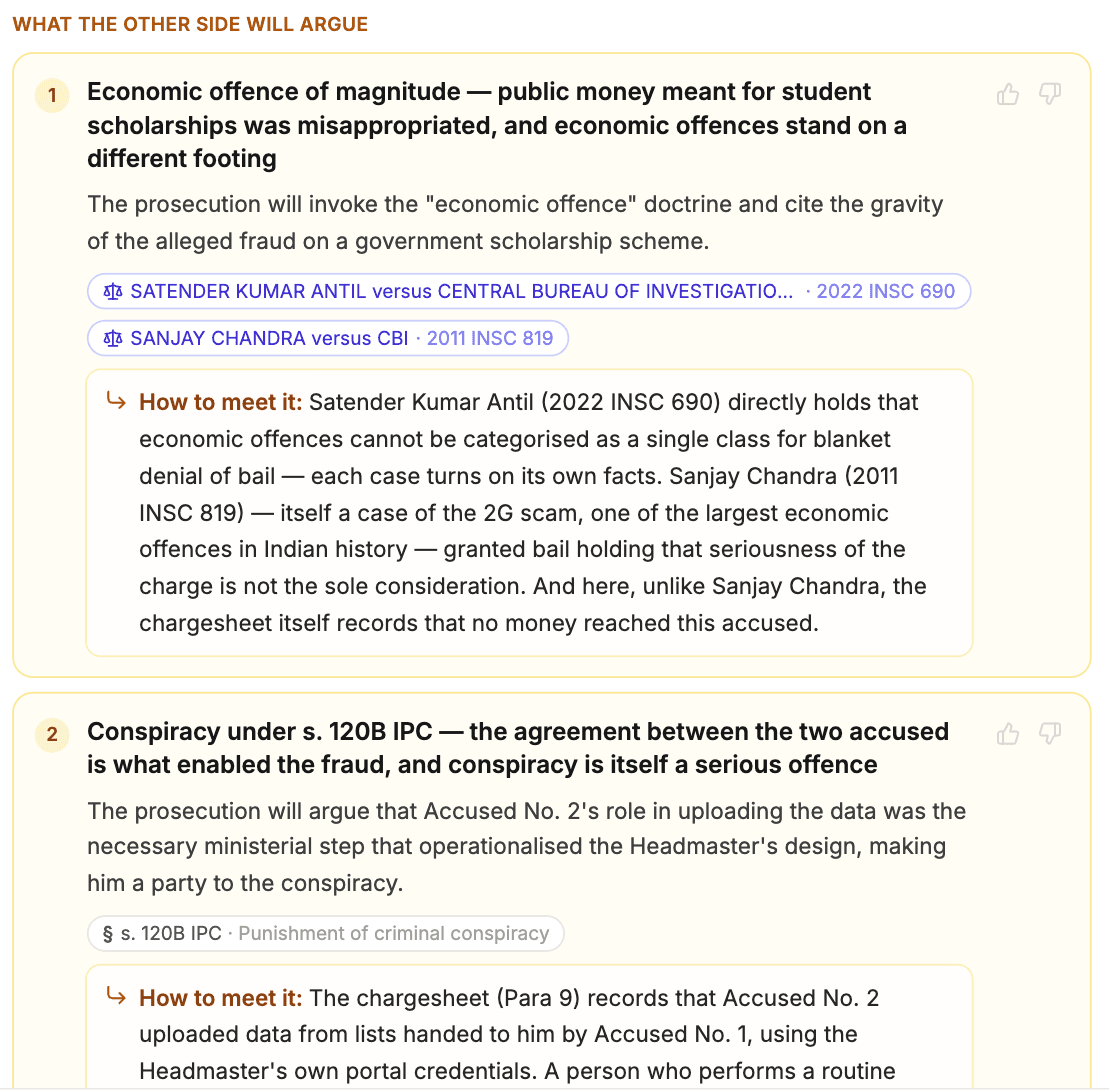
Describe your case, or open any draft, and get the arguments for, what the opposition will argue, and how to meet each — every point backed by a real judgment you can open. Built for Indian advocates.
How it works
Describe the case — or open a draft
Type the facts and what you're seeking ("regular bail before the Sessions Court"), or open any draft you're preparing: its confirmed facts and attached papers are already there.
Every issue is researched in the corpus
The builder breaks the matter into its legal issues, searches real Supreme Court and High Court judgments for each, and reads the papers in your case for what the record actually says.
You get the whole brief
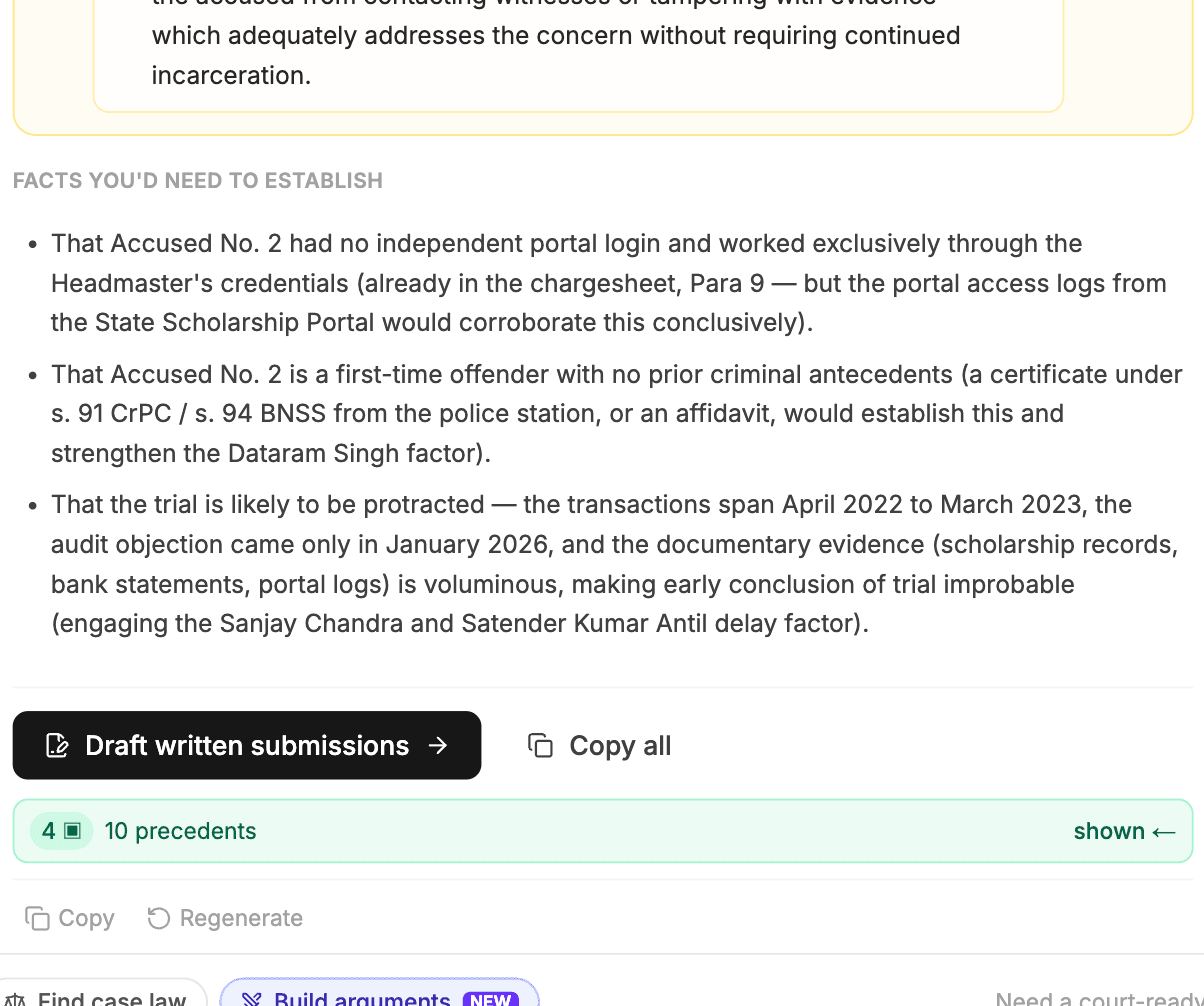
Your arguments, strongest first. What the other side will argue — and how to meet it. The facts you'd still need to establish. Each point pinned to a judgment you can open.
A citation you can trust, or no citation at all
A case chip appears on an argument only when that judgment was actually retrieved from the corpus for your matter. If nothing on point exists, the argument stands on its own — without a citation, never with an invented one. Every chip opens the judgment, so you verify before you rely.
- Supreme Court and High Court judgments, with the neutral citation
- Statutory provisions quoted from the Act, IPC ↔ BNS mapped
- What the record says, quoted separately from the law
Generic AI argument generators
- Citations: None — or invented onesA real judgment behind every point, opened in one click
- Your papers: Facts retyped by handReads the FIR, chargesheet or order you attached
- After the brief: Chat text, copy-pasteLands beside your draft; becomes written submissions in one click
Nothing retyped. Open the draft, build the arguments.
Every draft you prepare in LexPilot has an Arguments tab beside the document. It works from the facts you already confirmed and the papers already in the case — the document type fixes the forum and the relief, so you get the brief without answering a single question again. Save any authority to the case, or cite it at your cursor.
From the research side, the same brief turns into written submissions with one click — arguments, replies and authorities carried over.
Frequently asked questions
Is the Argument Builder legal advice?
No. It is research assistance for advocates. It organises the arguments a matter supports, on both sides, from real judgments — the professional judgment about what to argue, and how, is always yours. Verify every judgment before relying on it.
Where do the citations come from?
From LexPilot's corpus of Supreme Court and High Court judgments. A citation chip appears on an argument only when that judgment was actually retrieved for your matter; if no judgment supports a point, the point is shown without a citation rather than with an invented one.
Does it read my documents?
Yes. Attach the FIR, chargesheet, orders or agreement to your case and the builder reads them, quoting the record — for example what the chargesheet attributes to whom — separately from the law. Documents stay inside your case and are never used for anything else.
Can I get the brief in Hindi or another Indian language?
Yes. Choose the answer language and the brief is written in it, with case names, citations and section numbers kept exactly as in the judgments so they remain verifiable.
What does it cost?
Building a brief counts as one research query on your plan — the same credits as any research question. It is included in the Pro, Elite and Apex plans; see the pricing page.
Know what the other side will say
Free trial · Research assistance, not legal advice — always verify the judgment before relying on it.